Product Variations
To add a product variation create a new product or edit an existing one. Scroll to the bottom and click on Add Variation

Add your Variation such as: color, size, weight, package etc. and click Enter or the + icon to add the variation. After that type in all the variation types such as: small, medium, large etc. if you are doing Size variation.
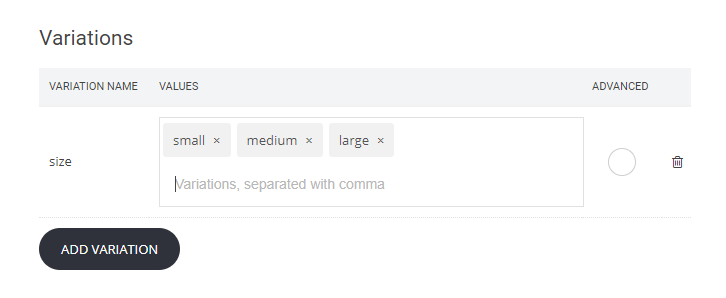
You can create as many variations as you want and types for them. If you want to have more advanced settings like different pricing, SKU, weight, inventory just click on the Advanced checkbox.
Below is an example of cross variations with advanced settings:

Related Articles
How to create a Membership Product
To have the option to sell membership in your site please go to Store -> Products -> Add Product You have four options to choose from, select the Membership When you create the product you have the standard fields that you need to fill for the ...Find your sitemap, robots.txt, product and blog feed
Sitemap - you can access by adding /sitemap.xml at the end of your website URL Blog feed - you can access by adding /feed at the end of your website URL Product feed - you can access by adding /product_feed at the end of your website URL ...Recurring Payments (Subscriptions)
All you have to do to do a subscription product is go to Store -> Add Product and select the type of product you are going to sell. You can do a subscription for any type of products. In the product you will see under the price that you enter a ...Introduction to Webhooks
Webhooks are a system of automated notifications indicating that an event has occurred on your website. Rather than requiring you to pull information via our API, webhooks push information to your destination when important events occur. You can ...A Step-by-Step Guide to Using Google Analytics’ Enhanced Ecommerce
Google Analytics Enhanced Ecommerce gives you the opportunity to get better insights in the shopping behavior of your users by sending product details, sales data and events directly into your Google Analytics (GA) reports. In this quick guide we'll ...