Recurring Payments (Subscriptions)
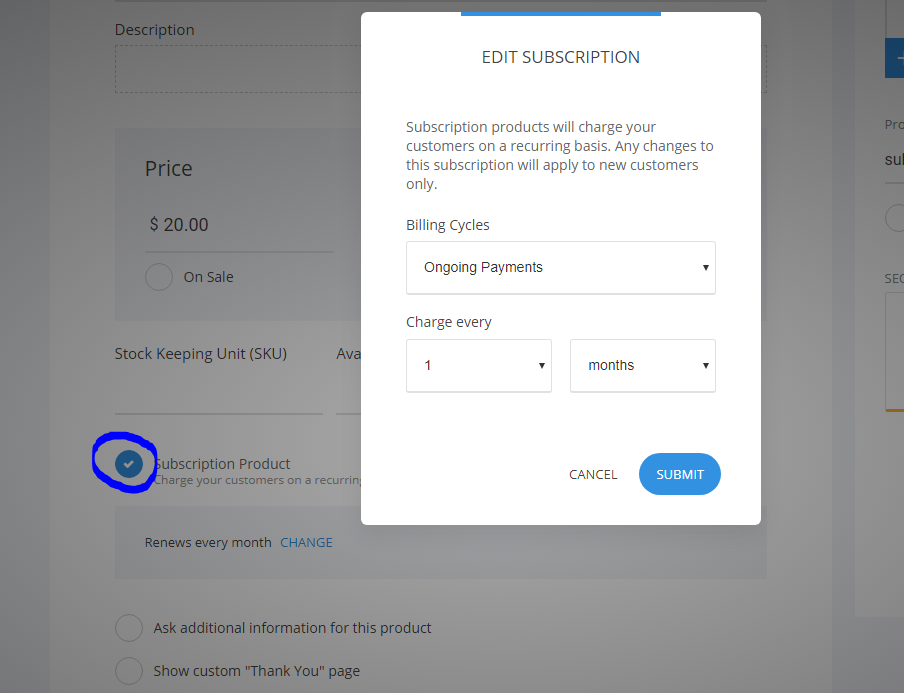
All you have to do to do a subscription product is go to Store -> Add Product and select the type of product you are going to sell. You can do a subscription for any type of products.
In the product you will see under the price that you enter a checkbox to make the product a Subscription and select the cycle of the payment.
Related Articles
Recurring Payments - Setting up your first Subscription [VIDEO GUIDE]
Accept iDEAL payments through Stripe
If you're selling in the Netherlads, you might want to offer payments through iDEAL to your customers. To accept payments through iDEAL, you need to have active Stripe account and connect it to your online store. Make sure you have Stripe enabled, ...Payment Options for the Online Stores
To the store you can connect one or many different payment processors to start collecting payments. You will find them by going to Store -> Settings -> Payments You need to create an account with the payment processor and add the credentials ...Add/Edit members
In the Engage section you will see all the current users on the website. You can filter them by groups or add a new one manually from the Add Member button. If you click on the member you will open their profile page. For each member you have their ...Stripe Connection
To connect Stripe to your website or funnel simply go to Store section and then click on Settings to enter the Store Settings. Then select Payments and 'Add Another' to add Stipe to your E-Commerce Store. You will be asked to add your Stripe Keys in ...