Create A Booking Operator
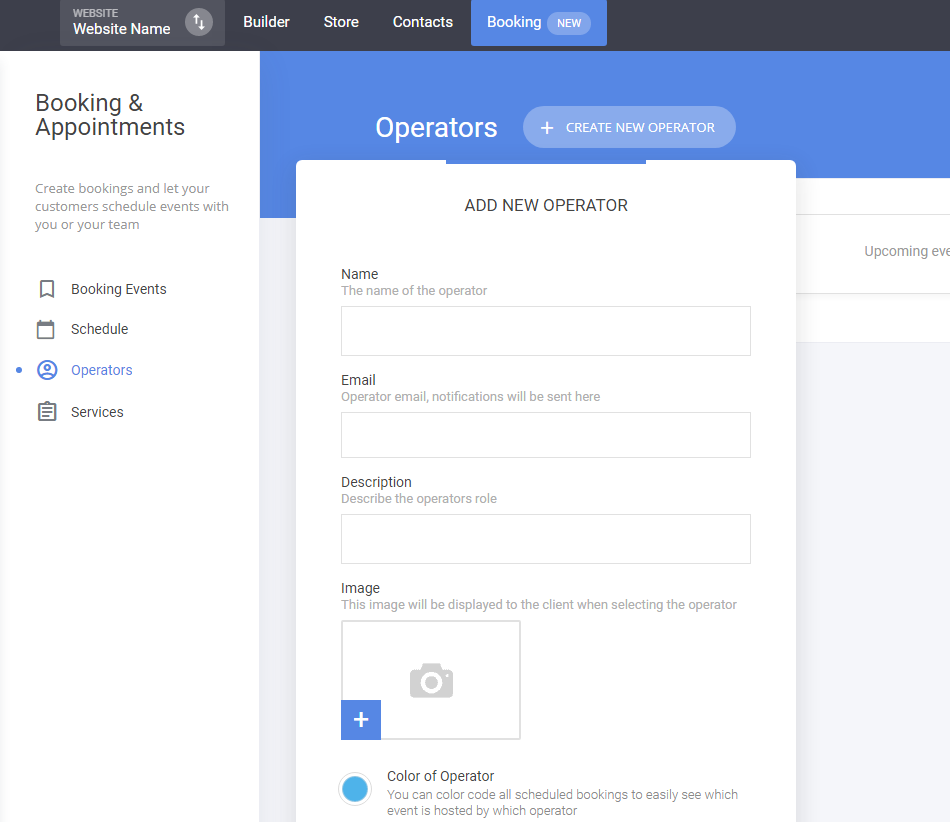
To create a booking operator simply go to Booking -> Operators -> Create New Operator
You can setup things as:
- Name
- Description (to show if you have multiple operators)
- Image (also shown if you have multiple operators)
- Color (for easier way to see scheduled meetings by color coding in the Schedule tab)
- Connect Google Calendar
Related Articles
Create A Booking Service
To create a booking service go to Booking -> Services -> Create New Service You have the ability to add: Name of the service Description Type of the service - Group or One-on-One. If you select a Group Meeting, that allows multiple people to book for ...Auto-assign Booking Operator
If your appointment event has more than one operator you can auto-assign depending on availability one of the operators added for that event. You do that from the Operators & Services tab when editing an event. You will see a checkbox to assign ...Booking Availability
To setup the Availability for an event, simply go to the Availability tab of that event where you can setup the availability for the operators in that meeting event. You have the ability to: Select the availability for which people can schedule a ...How to create a Membership Product
To have the option to sell membership in your site please go to Store -> Products -> Add Product You have four options to choose from, select the Membership When you create the product you have the standard fields that you need to fill for the ...Pre-Fill Your Form or Booking Fields From The URL
If you have unique URL that contains variables in it that are used for quick personalization or pre-filling, you can send that data to the forms. Example: the URL contains ?name=John?country=USA you can push the values for name and country to the ...